- emailbehindnat
- Jonathan Haack
- Haack’s Networking
- webmaster@haacksnetworking.org
//emailbehindnat//
Introduction
This tutorial covers how to setup system email on workstations behind NAT using exim4 in satellite mode. Although fairly straight forward, it took longer than expected. The main issues were getting the headers formatted correctly so recipients would not reject the email. Additionally, it took a bit of extra work to get system alerts to work. This tutorial presumes you have a functional and secure email server, which you will use for the email account on the workstation. Here’s my tutorial on that if it helps. Okay, let’s begin by installing the packages on the workstation:
sudo apt install exim4 mailutils
After you install exim4, you need to setup the main exim configuration file, which is located in /etc/exim4/update-exim4.conf.conf. To do that, I’ve made a copy pasta block which will set it all up for you.
cat << 'EOF' | sudo tee /etc/exim4/update-exim4.conf.conf dc_eximconfig_configtype='satellite' dc_smarthost='mail.haacksnetworking.org::587' dc_local_interfaces='127.0.0.1 ; ::1' dc_other_hostnames='' dc_readhost='haacksnetworking.org' dc_relay_domains='' dc_minimaldns='false' dc_hide_mailname='true' dc_localdelivery='net@haacksnetworking.org' EOF
First, the config establishes satellite mode and specifies the remote smtp server. After that, the config instructs exim4 to listen locally on both ipv4 and ipv6, declares that there are no other host names besides haacksnetworking.org for which it listens, and then rewrites the sender with dc_readhost thus ensuring that emails come from @haacksnetworking.org domain. Even though exim4 was only configured to listen locally, I still went ahead and explicitly disabled public relay. Additionally, I disabled minimal DNS which forces outgoing email to use the fqdn specified above instead of /etc/hosts. Hiding the mailname works in conjunction with rewritten sender to ensure that no “non-domain” headers appear in the outgoing email, thus ensuring delivery. Unfortunately, the dc_localdelivery does not function in satellite mode and/or if you have local delivery turned off; it’s retained here for long term problem solving.
Since this is a satellite setup only intended for outgoing email, it is important to disable local delivery in local macros, otherwise the workstation will interpret mails sent to otheruser@haacksnetworking.org as needing to be delivered locally, which is impossible. Secondly, there is currently a bug whereby exim4 in satellite mode cannot properly interpret ipv6 entries and/or bind to the ipv6-ready interface. In attempting to resolve this, I tried to explicitly declare the smarhost as an ipv6 address, as follows:
dc_smarthost='[2046::1bd7::f::6::::20]::587
Although this looks weird, this is what exim4 calls for in the man pages:
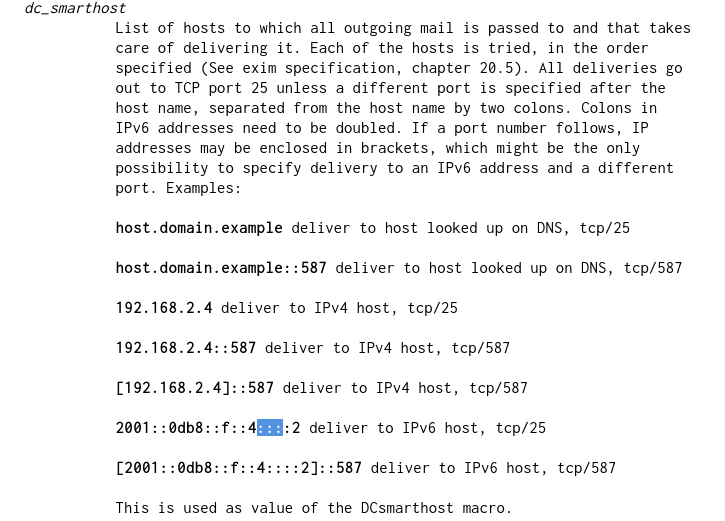
Despite this, exim4 interpreted the ipv6 address as a string/domain and tried to do a DNS check on it, which naturally failed. Moreover, if you leave the smarthost declared as ipv4 only, it succeeds unless it attempts to send out on ipv6, in which case it fails because there is current a bug whereby outgoing can’t bind to the ipv6 address. Because both ipv6 workarounds failed, I left the config listening on both protocols, but disabled outgoing on ipv6 since it is not currently functional. If when these bugs are fixed, I will come here and post the update. Here’s how I setup local macros to address these issues:
cat << 'EOF' | sudo tee /etc/exim4/exim4.conf.localmacros MAIN_TLS_ADVERTISE_HOSTS = REMOTE_SMTP_SMARTHOST_HOSTS_REQUIRE_TLS = * MAIN_LOCAL_DOMAINS = disable_ipv6 = true EOF
For whatever reason, disable_ipv6 must be lower case to be functional. Since I am cautious, I disabled advertising hosts, which means that the workstation won’t advertise TLS support to MTAs and/or MUAs attempting to connect or send directly to the exim4 server on the workstation. The require TLS stanza enforces outgoing TLS even if the server permits otherwise, thus ensuring that all outgoing emails on this workstation are TLS encrypted. By leaving main local domains empty, which I discussed briefly above, the exim4 server won’t attempt to deliver messages one sends to themself or to otheruser@haacksnetworking.org to the workstation itself. Next we need to specify a password file for exim4 to use for authentication with the remove smtp server:
cat << 'EOF' | sudo tee /etc/exim4/passwd.client mail.haacksnetworking.org:net:pass *:net:pass EOF
Replace ”pass” above with a secure non-dictionary 40 character password. Make sure shell access and sudo privs are not setup for regular email accounts. Secure the password file as follows:
sudo chown root:Debian-exim /etc/exim4/passwd.clientsudo chmod 640 /etc/exim4/passwd.client
After creating and securing your password file, let’s now focus on setting up the last part of exim4’s header rewriting functionality:
cat << 'EOF' | sudo tee /etc/email-addresses sexa: net@haacksnetworking.org root: net@haacksnetworking.org *: net@haacksnetworking.org EOF
This re-writes the headers on outgoing email so that instead of coming from user@<hostname> (from /etc/hosts), the email appears as net@haacksnetworking.org. Without this, exim4 would use the system email as the envelope-from instead of the remote server’s. This is essential for emails to arrive at Gmail, Microsoft, etc., without issue.
Remember, the workstation might be on a different domain as well, and if so, make sure that it is specified in hostname and mailname:
echo "net.outsidebox.vip" | sudo tee /etc/mailnameecho "net.outsidebox.vip" | sudo tee /etc/hostname
Similarly, make sure /etc/hosts is likewise setup for the workstation’s domain – not that of the remote smtp host. Here is an example:
127.0.0.1	localhost
127.0.1.1	net.outsidebox.vip		net

# The following lines are desirable for IPv6 capable hosts
::1     localhost ip6-localhost ip6-loopback
ff02::1 ip6-allnodes
ff02::2 ip6-allrouters
Remember, in almost all outgoing email scenarios, the email headers will be from net@haacksnetworking.org as per the satellite configuration above. The only exception to that, however, is when errors happen and the system attempts to email itself at root@<hostname>, pulling <hostname> from hosts file, hostname, and/or mailname depending on the error and/or faulting service. This means that the envelope for those emails will be root@net.outsidebox.vip but/and they will be sent to root@haacksnetworking.org. In order for the remote server to accept the system fault email, you simply need to add the <hostname> as a trusted origin for delivery. On the remote smtp host, open up /etc/postfix/main.cf and add the following <hostname> to this stanza:
myhostname = mail.haacksnetworking.org
alias_maps = hash:/etc/aliases
alias_database = hash:/etc/aliases
myorigin = /etc/mailname
mydestination = mail.haacksnetworking.org,
   haacksnetworking.org,
   mail.haacksnetworking.org,
   net.outsidebox.vip, ### Add the workstation domains as follows ###
   localhost.haacksnetworking.org,
   localhost
By changing the configuration to accept the workstation’s envelope, you can now receive sensitive system fault emails. As I noted earlier, exim4 does not honor dc_localdelivery= when it is in satellite mode. So, as a work around, you can allow that workstation’s domain on the remote server instead. If/when exim4 changes that behavior, I can come and tweak the tutorial. For now, however, allowing that origin on the remote server is my work around.
Optional: If you also want <hostname> (e.g., net.outsidebox.vip) to be able to directly receive emails from other people outside of your organization, then you can point <hostname>’s DNS records to your remote mail server. That is, you point net.outsidebox.vip to the A/AAAA and MX of mail.haacksnetworking.org, for example. This would allow folks in the wild to email user@net.outsidebox.vip and have it be accepted at user@haacksnetworking.org. Personally, I don’t need that, but I did test it and ensure it worked.
Thanks,
oemb1905